- OPTIONS preflight browser → server · Origin + Access-Control-Request-*
- Allow check server → browser · Access-Control-Allow-* (or blocked here)
- Actual request sent only if the check passes
CORS errors occur when a browser rejects a cross-origin request or refuses
to expose its response after a CORS check. They are difficult to debug:
fetch() usually reports only a generic network error, and
JavaScript cannot read the blocked response.
Why CORS errors are difficult to debug
The browser can hide or separate the evidence needed to identify a failed CORS check.
- The console reports the browser's CORS decision. The Network panel shows the request and response data available to DevTools.
-
A failed preflight leaves no actual
GET,POST, or other application request to inspect. -
A cached preflight result can remove
OPTIONSfrom a later capture, so its absence does not prove that no preflight was required.
CORS headers that decide access
A cross-origin request in
CORS mode
requires preflight when its method or request headers are not CORS-safelisted.
A matching preflight-cache entry can suppress OPTIONS. The
actual response still requires a valid
Access-Control-Allow-Origin.
| Header | Side | What it does |
|---|---|---|
Origin | Request | Identifies the origin making the request. |
Access-Control-Request-MethodAccess-Control-Request-Headers | Request (preflight) | The method and non-safelisted headers the actual request will use. |
Access-Control-Allow-Origin | Response | Which origin may read the response: one serialized origin or *. |
Access-Control-Allow-MethodsAccess-Control-Allow-Headers | Response (preflight) |
The non-safelisted methods and request headers approved by preflight.
List Authorization explicitly; * does not
match it.
|
Access-Control-Allow-Credentials | Response |
Must be true to expose a response when credentials mode
is include. In that mode, allow-origin cannot be *.
|
How to debug a CORS error with HTTP Debugger
HTTP Debugger shows the OPTIONS preflight
request and server response in a single capture, including their HTTP
headers and any content. Use this information to identify the exact CORS
check that prevented the application request or stopped JavaScript from
accessing its response.
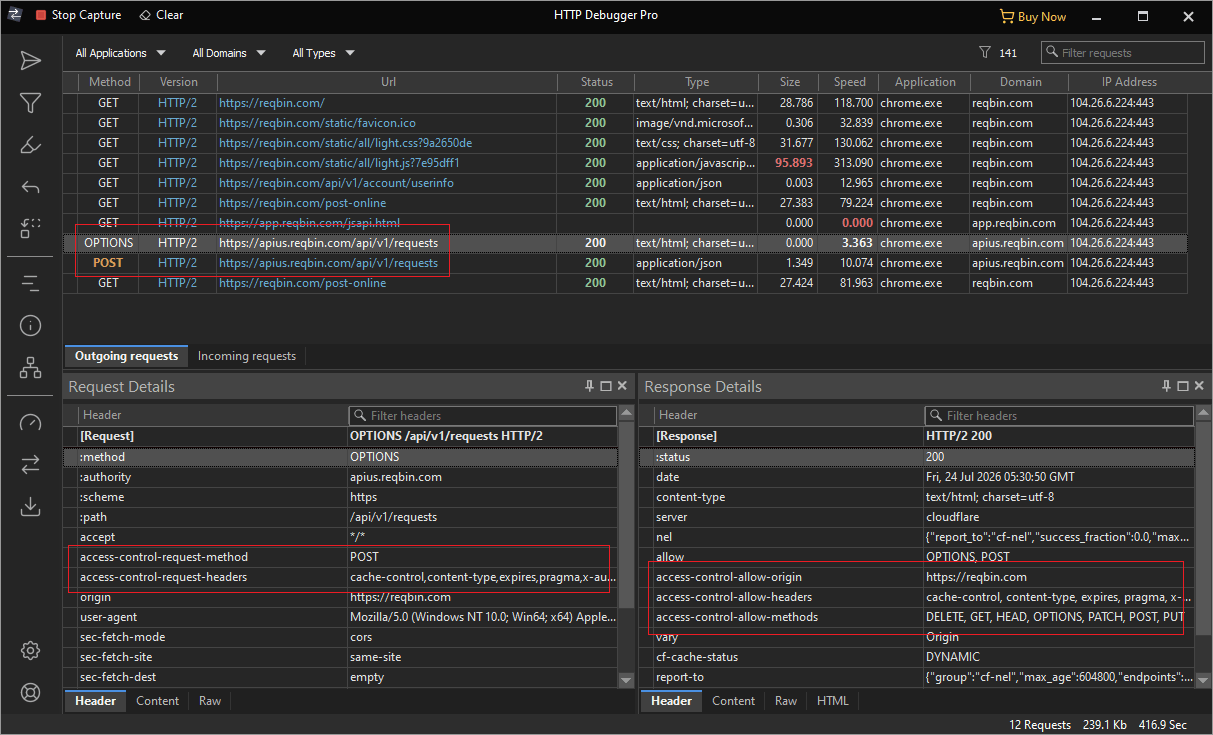
OPTIONS preflight request and
response, including their HTTP headers.
Capture the request
Start capturing in HTTP Debugger, then reproduce your CORS error in the browser.
Inspect the CORS exchange
Use the quick filters in the grid toolbar to isolate the
OPTIONS request, then select it. HTTP Debugger shows the
preflight request beside its response, each with full
headers. On the request,
Origin names the calling site, and
Access-Control-Request-Method and
Access-Control-Request-Headers declare the method and
headers the browser plans to send. On the response, the matching
Access-Control-Allow-* headers state what the server
permits: Access-Control-Allow-Origin the allowed origin,
Access-Control-Allow-Methods the allowed methods, and
Access-Control-Allow-Headers the allowed request headers.
OPTIONS preflight request.OPTIONS /v1/orders HTTP/1.1
Host: api.example.com
Origin: http://localhost:3000
Access-Control-Request-Method: POST
Access-Control-Request-Headers: content-typeHTTP/1.1 204 No Content
Date: Tue, 14 Jul 2026 10:22:04 GMT
Access-Control-Allow-Origin: http://localhost:3000
Access-Control-Allow-Methods: GET, POST, PUT, DELETE
Access-Control-Allow-Headers: Content-Type
Vary: OriginDebug CORS errors without modifying server code
HTTP Debugger can rewrite requests and responses on the fly, so you
can test a CORS fix before applying and deploying it to your server.
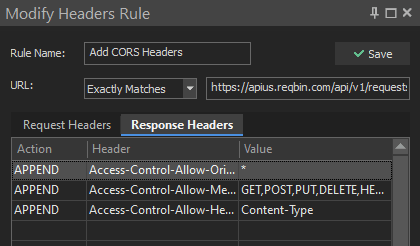
Use HTTP Modifier to append
the missing Access-Control-Allow-* headers and confirm
the browser now passes the CORS check. An HTTP Modifier rule can do
the reverse: remove the CORS headers to see how your app handles CORS
errors.
Common CORS errors and what they look like in traffic
Console wording varies by browser and version. These message fragments point to the relevant check. MDN maintains a complete CORS errors reference.
| Console clue | What to check |
|---|---|
No 'Access-Control-Allow-Origin' header |
Check the response named by the message: the OPTIONS
response for a preflight failure, otherwise the application response.
|
Method or request header field ... is not allowed |
Compare Access-Control-Request-Method and
Access-Control-Request-Headers with the corresponding
allow headers in the preflight response.
|
preflight ... HTTP ok status or channel did not succeed |
Inspect the OPTIONS status and connection. The preflight
must complete with a successful response.
|
Multiple CORS header 'Access-Control-Allow-Origin' not allowed |
The response contains more than one allow-origin value. Return one
serialized origin or *, not a list.
|
Access-Control-Allow-Origin ... must not be the wildcard '*' |
The request uses credentials mode include, but the server
returned *. Return the specific Origin and add
Access-Control-Allow-Credentials: true.
|
Fix CORS at the server boundary
A production fix requires control over the response delivered to the browser. Configure the origin server, an API gateway, or a backend proxy. Frontend JavaScript cannot add CORS headers to a blocked response.
-
For an allowlist, validate
Origin, return one matching origin, and addVary: Origin. Use*only for public, non-credentialed access. -
For credentials mode
include, return the exact origin andAccess-Control-Allow-Credentials: true. -
Let preflight
OPTIONSreach the CORS handler. Return a successful status with allow-origin and any required method and header permissions. - Add CORS headers to error responses when the frontend must read their status or body.
CORS is not authorization. Keep authentication and CSRF controls in place.
CORS error FAQ
Can frontend JavaScript fix a CORS error?
No. When the API permits, client code can use a CORS-safelisted method and request headers to avoid preflight. It cannot override the browser's CORS check on the response.
Does fetch mode no-cors fix a CORS error?
No. mode: "no-cors" restricts the request and returns an
opaque response. JavaScript cannot read its status, headers, or body.
Can Access-Control-Allow-Origin contain several origins?
No. Multiple header values become a combined value that cannot match
the request origin, so the CORS check fails. Return one validated
origin and add Vary: Origin when responses vary by origin.