The Auto-Responder in HTTP Debugger lets you mock an HTTP response: match a request by its URL and return the exact status line, headers, and body you define, so the request never reaches the real server. Use it to stub an API endpoint during frontend work, simulate 500 and 404 errors on demand, or serve an edge-case payload from a local file, without touching server code or standing up a staging backend.
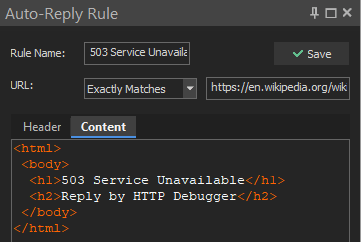
Note: the Auto-Responder replaces regular HTTP and HTTPS responses. gRPC calls and WebSocket connections are captured in read-only mode and are not replaced by Auto-Responder rules.
How Response Mocking Works
An Auto-Responder rule has two parts: a match condition against the request URL, and the response to send back. When a captured request matches, HTTP Debugger builds a synthetic response from the rule and returns it right away. The origin server is never contacted, so the same response comes back every run, on any machine, with no backend dependency.
Because the response is defined as raw HTTP, you control the status code, every header, and the body. That makes the Auto-Responder a practical HTTP response simulator for states a live server rarely produces on command.
Developer Use Cases
Mock an API During Frontend Development
When the backend is not ready, mock the endpoints the UI calls and return
fixed JSON. The frontend runs against stable, predictable data, and client
work can start before the server exists. Set the match mode to
Contains with the value /api/profile, then
define the response header and body.
Respond With Header:
HTTP/1.1 200 OK
Content-Type: application/json
Connection: close
Respond With Content:
{ "id": 42, "name": "Ada Lovelace", "role": "admin" }Simulate 500, 404, and Other Error Responses
Error-handling paths are hard to reach against a healthy server. Point a rule at the request and return a 500 Internal Server Error or a 404 Not Found to confirm the UI shows the right message, retries, or fallback instead of a blank screen.
HTTP/1.1 500 Internal Server Error
Content-Type: text/html
Content-Length: 0
Connection: close
Simulate a Gateway Timeout or Service Outage
Return a 503 Service Unavailable or a 504 Gateway Timeout to exercise the client failure path for an unreachable or overloaded upstream. HTTP Debugger sends the response immediately, so this checks how your code reacts to a timeout status, not how it behaves under real network latency.
HTTP/1.1 504 Gateway Timeout
Content-Type: text/html
Content-Length: 0
Connection: close
Serve Edge-Case Payloads From a File
Point a rule at a file on disk to return a large document, a malformed body, an unusual Content-Type, or a captured production response. Serving a fixture from a file reproduces the exact bytes every time, which is useful for regression tests and bug repros.
Match the Request
A rule matches the request URL (scheme, host, path, and query) using one of five modes: exact match, contains, starts with, ends with, or regular expression. Matching is case-insensitive. The HTTP method is not part of the matched URL, so target a request by its path or host rather than its verb.
Regex that matches a host and path prefix:
httpdebugger\.com/api/Regex that matches any URL ending in .json:
\.json(\?|$)Define the Response
A rule sends a response header plus, optionally, inline content or a file. Combine the header with either the content or the file.
Respond With Header
The HTTP response header sent back to your browser or application. It must
be a valid HTTP header with a status code, and can carry cookies, CORS
headers, or a Location for a redirect.
HTTP/1.1 302 Found
Location: https://www.httpdebugger.com
Connection: close
Respond With Content
The HTTP response body sent to your browser or application. HTTP Debugger calculates the Content-Length for the content, but you need to provide a valid Content-Type for it.
Respond With a File
Return a file from your local disk as the response body. HTTP Debugger calculates the Content-Length for that file, but you need to provide a valid Content-Type for it.
Create a Rule From the Traffic Grid
Right-click a captured request in the grid to create an Auto-Responder rule for it. The rule is prefilled from the selected request, so you can turn a real response into a mock in a couple of clicks.
Note: browsers tend to cache connections, so restart the browser for changes to take effect. To keep capture fast, disable the Auto-Responder when it is not in use.
To change parts of a real response instead of replacing it, such as adding or removing a header or editing part of the body, use the HTTP Modifier. To send an edited request yourself and inspect the live HTTP response, use the HTTP Submitter.